Photo Locations
Author(s): MrHam88.
This page summarises how photo locations are configured in Pokémon HeartGold and SoulSilver, and provides guidance on editing existing locations or adding new ones.
Location
Photo location definitions are stored in the NARC at: a/2/5/4.
Photo album icon graphics are stored in the NARC at: a/1/7/1.
- Each file in this NARC represents a single camera/photo location that can be used by the
TakePhotocommand, see scrcmd for details on command usage. - The structure used by the game is documented in the pokeheartgold decomp here
- Most vanilla photo locations are listed on Bulbapedia, however their order does not match the order of entries in this NARC.
File Structure
Each entry file inside the unpacked NARC is 16 bytes long and follows the format:
AA AA BB BB CC CC DD DD EE EE FF FF GG GG HH HH
Field Definitions
| Bytes | Name | Description |
|---|---|---|
AA AA | Header ID | Header where the photo can be taken |
BB BB | Photo Album Icon ID | Icon shown in the photo album (see below) |
CC CC | Player X Coordinate | Global X coordinate of the player as they appear in the photo |
DD DD | Player Y Coordinate | Global Y coordinate of the player as they appear in the photo |
EE EE | Unknown | Always 01 FF in vanilla |
FF FF | Overworld Entry ID | NPC that appears in the photo, or 00 00 if no NPC |
GG GG | Parameter 1 | Unknown |
HH HH | Parameter 2 | Unknown |
All values are little endian halfwords.
Photo Album Icons
BB BB determines the icon displayed in the photo album for that picture.
| Value | Icon |
|---|---|
00 00 | Mountain landscape |
01 00 | Sea |
02 00 | Yellow plain |
03 00 | Rough terrain |
04 00 | Cave (interior) |
05 00 | Building (exterior) |
06 00 | Building (interior) |
07 00 | Grassland |
08 00 | Forest |
09 00 | Lake |
Only some of these are used in vanilla.
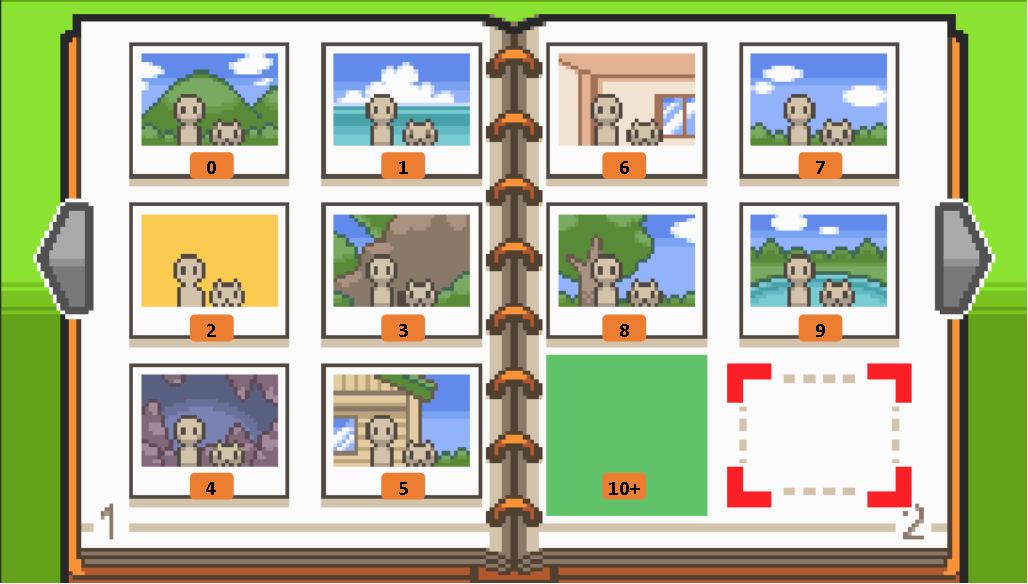
NPC Behaviour
The Overworld Entry ID controls whether the photo contains an NPC.
| Value | Behaviour |
|---|---|
00 00 | Group photo with the player's full party |
| Non‑zero | Player + first Pokémon + specified NPC |
The NPC used in the photo is taken directly from this ID, regardless of what NPCs are actually present on the map.
Unknown Parameters
GG GG and HH HH are used in some vanilla entries but their exact function is currently unknown.
Important behaviour observed:
- If no NPC is present (
Overworld Entry ID = 0), both parameters must be00 00. - If either value is non‑zero in this situation, the game fails to load.
Despite appearing in some entries, these parameters do not appear to visibly affect the resulting photo.
Their purpose remains unresolved.
Example Entry
Example: file 0009 (Route 34 Day Care).
26 00 05 00 6B 01 9A 01 01 FF 4A 01 00 00 00 00
Breakdown:
| Value | Meaning |
|---|---|
26 00 | Header 38 (Route 34) |
05 00 | Building exterior icon |
6B 01 | Player X coordinate 363 |
9A 01 | Player Y coordinate 410 |
01 FF | Unknown constant |
4A 01 | Overworld Entry 330 (Day Care Man) |
00 00 | Parameter 1 |
00 00 | Parameter 2 |
Player global coordinates can be read from the DSPRE Event Editor by hovering the cursor over the map.
Adding New Photo locations
The system is self-contained inside the NARC, so new entries can safely be added.
Steps
- Unpack the NARC
a/2/5/4. - Create a new 16‑byte file matching the format described above for your desired photograph (or copy and edit an existing file as a starting point).
- Set the new file's name to be the last current file +1
- Ensure no temporary or backup files remain in the folder.
- Repack the NARC.
A reference guide for unpacking NARCs can be found here
Once added, the new locations can be triggered normally using the TakePhoto script command and the index number of the new photo location. See the latest version of scrcmd to confirm the command name, parameters and parameter types.